Google Is Changing Android Backup Storage from July 7: What Users Should Know
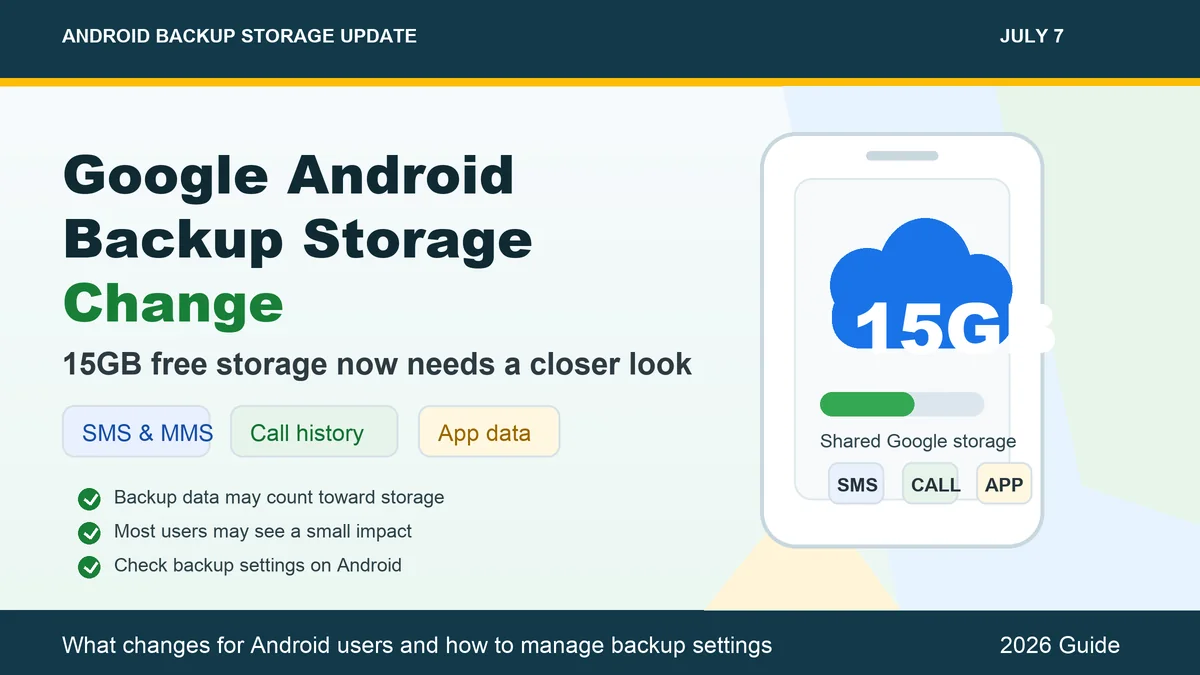
Google’s free 15GB storage has always been shared across Gmail, Google Drive and Google Photos. Now, from July 7, 2026, Android phone backup data will also become more important for users because backed-up phone data can use part of this free storage limit.
This does not mean Google is removing the 15GB free storage. The main change is that Android backup data, such as SMS, MMS, call history, app data and device settings, may now count toward the same Google Account storage that is already used by Gmail, Drive and Photos.
For most Android users, the immediate impact may be small. Reports suggest that average Android backup data may add around 40MB. However, users who are already close to the 15GB limit should check their backup settings and storage usage.
What Is Changing from July 7?
From July 7, Android backup data will be treated more directly as part of your Google storage usage. Android backups can include important phone data that helps restore your information when you reset your phone or move to a new device.
This may include:
SMS and MMS messages
Call history
Device settings
Apps and app data
Contacts
Some Google app-related backup data
Earlier, many users did not worry much about Android device backup size. But now, if your Google Account storage is already full because of large Gmail attachments, Drive files or Google Photos backups, Android backup data may also become part of the storage pressure.
Is Google Reducing the Free 15GB Storage?
No. The free Google Account storage is still up to 15GB for regular users. The change is not about removing the free plan. Instead, it is about what counts inside that 15GB storage.
Your 15GB is shared across:
Gmail
Google Drive
Google Photos
Android phone backup data
This means users should think of Google storage as one combined space, not separate storage for each service.
Who Will Be Affected Most?
Most Android users may not face an immediate problem because Android backup files are usually much smaller than photos, videos or Drive files.
However, the change can affect users who:
Already have nearly full Google storage
Use Google Photos backup heavily
Receive large email attachments in Gmail
Store many PDFs, videos or documents in Drive
Use multiple Android phones with the same Google Account
Do not regularly clean old files and backups
If your account is already close to 15GB, even a small amount of backup data can make it harder to receive emails, upload files or back up photos.
New Backup Controls for Android Users
Google is also giving users more control over what gets backed up. Depending on your phone model and Android version, you may be able to manage backup categories more clearly.
Users can check or control backup options for data such as:
SMS and MMS
Call history
Device settings
App data
Photos and videos
On many Android phones, you can check this by going to:
Settings > Google > All services > Backup
You can also open the Google One app or visit Google storage manager to see what is using your account storage.
Should You Turn Off Android Backup?
Turning off backup is not recommended for everyone. Android backup is useful when you buy a new phone, reset your current phone or lose access to your device. It helps restore messages, call history, settings and app data.
However, if your Google storage is almost full, you can review what is being backed up. For example, you may want to manage photo and video backups separately, delete old files, or remove unnecessary data from Drive and Gmail.
How to Free Up Google Storage
If your free 15GB storage is getting full, try these steps:
Delete large Gmail attachments you no longer need
Empty Gmail spam and trash folders
Remove old videos from Google Photos
Delete duplicate or unnecessary Drive files
Check old Android device backups
Use Google One storage manager to find large files
Download important files offline before deleting them
Photos and videos usually take much more space than SMS or call history, so cleaning Google Photos can free up storage faster.
Final Words
Google’s July 7 Android backup storage change is not a major shock for most users, but it is a reminder to manage cloud storage carefully. The free 15GB storage remains useful, but it is shared across many Google services.
If your account has plenty of free space, you may not notice much difference. But if your storage is almost full, now is a good time to review Android backup settings, clean unnecessary files and decide what really needs to stay in the cloud.
Disclaimer: This article is for general information only. Features and settings may vary depending on Android version, phone brand and Google account settings.
Google Android Backup Storage Change from July 7: What Happens to Your Free 15GB?
From July 7, Android phone backups such as SMS, call history, app data and device settings may use part of your free 15GB Google storage. Here’s what changes and how to manage it.
ED
Editorial Desk
7 Jul 2026, 8:36 PM · 2885 views · 4 min read